Greenbet Login
When I first opened the Greenbet login screen, I counted four tabs. Two of them don't even ask for a password. That's handy, but it also explains why some players get stuck. They pick a tab that doesn't match how they signed up. Once you know which sign-in method fits your account, getting in takes seconds. Here's how I'd do it.
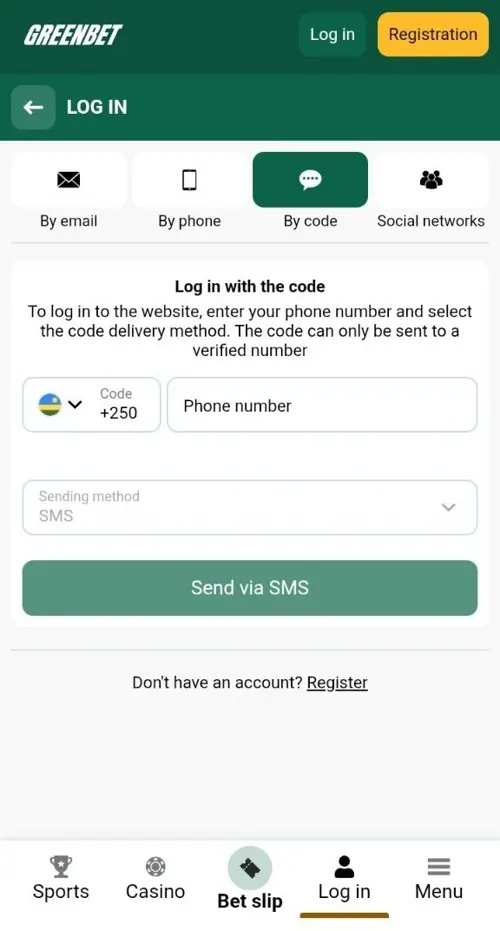 By code: no password
01Greenbet Sign-In Options Step by Step
Greenbet gives you four sign-in options: By email, By phone, By code and Social networks. All four open the same account on the website and in the app.
Tap LOG IN in the top right corner of greenbet.gg. The form opens on the By email tab. The active tab turns dark green. Under every form, there's a "Don't have an account? Register" link for new players.
| Tab | What you enter | Password |
|---|---|---|
| By email | Email or account ID | Yes |
| By phone | Phone number | Yes |
| By code | Verified phone number + SMS code | No |
| Social networks | Telegram, Google or X | No |
Sign-In with Email or Account ID and Password
This tab accepts your email or your account ID, plus your password. I like that one field handles both.
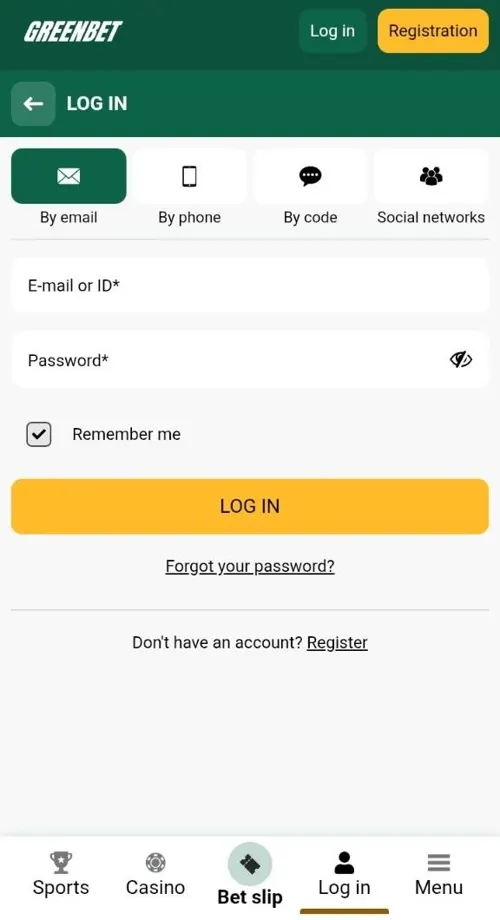
- Tap LOG IN.
- Stay on the By email tab.
- Type your email or ID in the "E-mail or ID" field.
- Enter your password.
- Tap the yellow LOG IN button.
There's a small eye icon in the password field. Tap it to see what you typed. It's a quick way to catch typos before you sign in.
Sign-In with a Phone Number and Password
Phone sign-in uses your mobile number and your password. It's the natural choice if you registered by phone.
- Open the By phone tab.
- Check the country code on the left.
- Enter your number.
- Type your password and tap LOG IN.
The country code field has a little flag and a drop-down arrow. When I checked, it showed the Kenyan flag and +254. Take a second to make sure it's your country. A wrong code is the most common reason this tab doesn't work.
One-Time SMS Code Sign-In Without a Password
Code sign-in gets you in without a password. Greenbet sends a one-time code to your phone.
- Open the By code tab.
- Enter your phone number.
- Leave SMS as the sending method.
- Tap "Send via SMS".
- Enter the code from the message.
This is my favourite option on a phone. The SMS lands on the same device, so you're in within seconds. It's also the fastest way back in if you forget your password.
Sign-In Through a Linked Telegram, Google or X Account
Social sign-in lets you jump in with Telegram, Google or X. You don't need a Greenbet password.
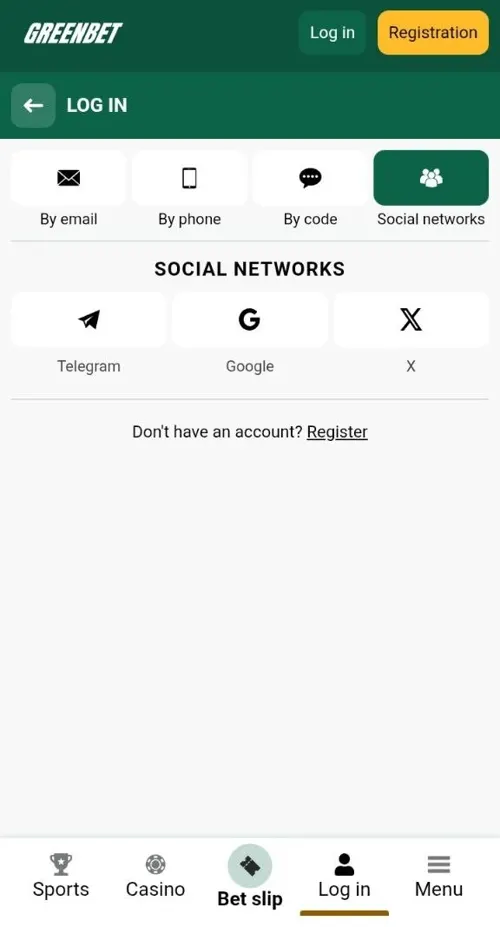
- Open the Social networks tab.
- Choose Telegram, Google or X.
- Confirm access in the pop-up window.
That's one tap and you're in. Just keep access to the network account you used, because it's your key to Greenbet.
02Sign-In Method Dependence on the Registration Method
The best sign-in method depends on how you registered. Match the tab to your signup and you'll never get stuck.
| How you registered | How to sign in |
|---|---|
| One-click | Account ID + password on the By email tab |
| By phone | Phone + password, or SMS code |
| By e-mail | Email + password |
| Telegram, Google or X | The same network |
The By code tab works for any account with a verified phone number. That's why I always recommend verifying your phone early. It gives you a backup way in, whatever method you used at signup.
Account ID and Password Storage After One-Click Registration
One-click registration doesn't ask for an email or phone. Your login is your account ID and password. Save them as soon as you register.
Here's what I'd do right after signing up with one click:
- Write down or save your account ID and password.
- Keep them in a password manager or a safe note.
- Add your email and phone number in Personal profile.
- Confirm your phone by SMS.
Steps 3 and 4 are worth it. They give you more ways to sign in, and your welcome bonus needs them anyway.
Verified Phone Number as a Condition for Code Sign-In
The By code tab works only with a verified phone number. Greenbet says this right in the form.
A verified number is one you confirmed with an SMS code. If you registered by phone, it's already done. If you used another method, confirm it in your profile.
I see this rule as a plus. Nobody can request your code to a different phone, so code sign-in stays secure. A verified number also unlocks your welcome bonus and free spins in casino promotions.
03Restoring Access to a Greenbet Account
If you can't sign in, Greenbet gives you a few ways back. You can reset your password, use an SMS code or contact the team directly.
| Your situation | Fastest way back in |
|---|---|
| Forgot your password | "Forgot your password?" link |
| Phone number verified | SMS code sign-in |
| Signed up with a social network | Same network |
| Lost access to email and phone | [email protected] |
Password Reset Through the Forgot Your Password Link
Click "Forgot your password?" under the LOG IN button and follow the steps. The link appears on the By email and By phone tabs.
- Tap LOG IN.
- Open the By email or By phone tab.
- Click "Forgot your password?".
- Follow the instructions on screen.
- Set a new password and sign in.
Got a verified number? You can skip the reset. Sign in with an SMS code and set a fresh password in the Security section.
Incorrect Password and Missing SMS Code Errors
Most sign-in errors come from a typo, the wrong tab or an unverified number. They're quick to fix.
| Problem | Likely cause | Quick fix |
|---|---|---|
| Wrong password | Typo or keyboard layout | Tap the eye icon to check |
| Account not found | Wrong tab for your data | Switch to the matching tab |
| ID doesn't work | ID typed in the phone field | Use the By email tab |
| SMS code not arriving | Number not verified | Sign in with a password and verify it |
| SMS code not arriving | Wrong country code | Check the flag and code |
If you're still stuck, don't keep guessing passwords. Use "Forgot your password?" instead.
Contact Addresses for Blocked or Compromised Accounts
Greenbet has separate addresses for different account issues. Writing to the right one gets you help faster.
| Issue | Contact |
|---|---|
| Blocked account | [email protected] |
| Suspicious activity | [email protected] |
| General questions | [email protected] |
| Quick help | Live chat, the green icon in the bottom right corner |
When you write, include your account ID or email. Greenbet may ask for ID documents or a photo of you holding your ID with your face visible. Have them ready and the team can sort things out quickly.
04Account Safety After Signing In
Keeping your account safe is easy. Use "Remember me" wisely and check your Security and Personal profile sections after your first sign-in.
- Use a password you don't use anywhere else.
- Verify your phone number.
- Untick "Remember me" on shared devices.
- Write to [email protected] if anything looks unusual.
Remember Me Option on Personal and Shared Devices
The "Remember me" box keeps you signed in on your device. It comes ticked by default.
On your own phone or laptop, I'd leave it on. You'll skip the login screen and go straight to your account. On a shared or borrowed device, untick it before you sign in. Then sign out when you're done.
There's another reason to use your own device. Greenbet allows one bonus account per shared computer and IP address. A shared device can cause trouble with bonuses.
Security and Personal Profile Sections
The account menu has separate Security and Personal profile sections. I'd open both right after your first sign-in.
On a new account, I noticed small red exclamation marks next to Deposit, Personal profile and Security. They point to sections that still need your attention. Fill in your full name, email, country and phone number in Personal profile. Then check the options in Security.
A complete profile helps in two ways. It gives you more sign-in and recovery options. It also unlocks your welcome bonus.
FAQFrequently Asked Questions
Here are quick answers to the questions I hear most about Greenbet login.
Where can I find my Greenbet account ID?
Greenbet gives you an account ID when you register with one click. Save it right away, and if you lose it, ask [email protected].
Can I sign in to Greenbet without a password?
Yes. Use the By code tab with a verified phone, or sign in through Telegram, Google or X.
Why is my SMS login code not arriving?
Codes go only to verified numbers. Confirm your number in your profile and check the country code.
Can I sign in with Google if I registered by email?
Social sign-in works for accounts created through the same network. If you registered by email, use the By email tab.
Does one Greenbet account work on the app and the website?
Yes. One account works on the website, the Android app and the iOS web app.
Who do I contact if my Greenbet account is blocked?
Write to [email protected] with your account ID or email.